The Office Manager's Guide to AI Tools That Don't Break the Budget
Why Your AI Spending Might Be Out of Control (And How to Fix It)
If you're managing costs for a professional services office, you've probably noticed something alarming lately: AI tool subscriptions are multiplying like rabbits. Marketing wants ChatGPT Plus. Sales needs Claude. The dev team is asking for GitHub Copilot. Each one is "only" £15-30/month per user, but suddenly your software budget has a new line item that rivals your Microsoft licences.
Here's the problem: you're buying multiple AI subscriptions when you could be managing one platform.
The Hidden Costs of Multiple AI Tools
Let's talk about what office managers actually deal with:
1. Subscription Sprawl
- 5 team members × 3 different AI tools × £25/month = £375/month minimum
- That's £4,500/year before you scale
- Add more staff? The maths gets painful fast
2. Administrative Overhead
- Tracking multiple vendors and renewal dates
- Managing separate invoices and payment methods
- Handling access requests and offboarding across platforms
- Time = money, and this eats both
3. Inconsistent Usage
- Some staff max out their subscriptions, others barely use them
- You're paying per seat whether they log in or not
- No visibility into ROI across the organisation
4. Security and Compliance Headaches
- Multiple platforms = multiple security policies to review
- Data scattered across different vendors
- More surfaces to audit and manage
The Smarter Approach: A Unified AI Platform also known as AI as a Service
What if instead of managing subscriptions to OpenAI, Anthropic, Google, and others separately, your organisation had one platform with access to multiple AI models?
This is where AI as a Service (AIaaS) changes the cost equation:
Consolidation Benefits:
- One vendor relationship instead of three or four
- Single invoice, single renewal date, single point of contact
- Centralised user management (easy onboarding/offboarding)
- Better visibility into who's using what and how much
Flexible Resource Allocation:
- Share resources across the team instead of paying per rigid seat
- Scale up or down based on actual usage
- Let power users consume more without paying for inactive accounts
IT Partnership Model:
- Work with your existing IT services provider
- They handle the technical setup and support
- You get business-grade support, not just a help desk ticket
Real-World Example: Small Solicitors Firm
Let's look at a typical scenario—a conveyancing firm with 15 staff members who need AI tools for legal research, document drafting, and client communications.
Traditional Multi-Subscription Approach:
Scenario 1: Conservative (1 subscription per user)
- 15 staff × ChatGPT Plus at £18/month = £270/month
- Annual cost: £3,240
- What you get: Access to one AI model, limited to OpenAI's ecosystem
Scenario 2: Realistic (Mixed usage)
- 10 staff with ChatGPT Plus (£18/month) = £180/month
- 5 staff with Claude Pro (£16/month) = £80/month
- Monthly total: £260
- Annual cost: £3,120
- What you get: Two different platforms, two invoices, two sets of logins to manage
Scenario 3: Power Users (Multiple subscriptions per person)
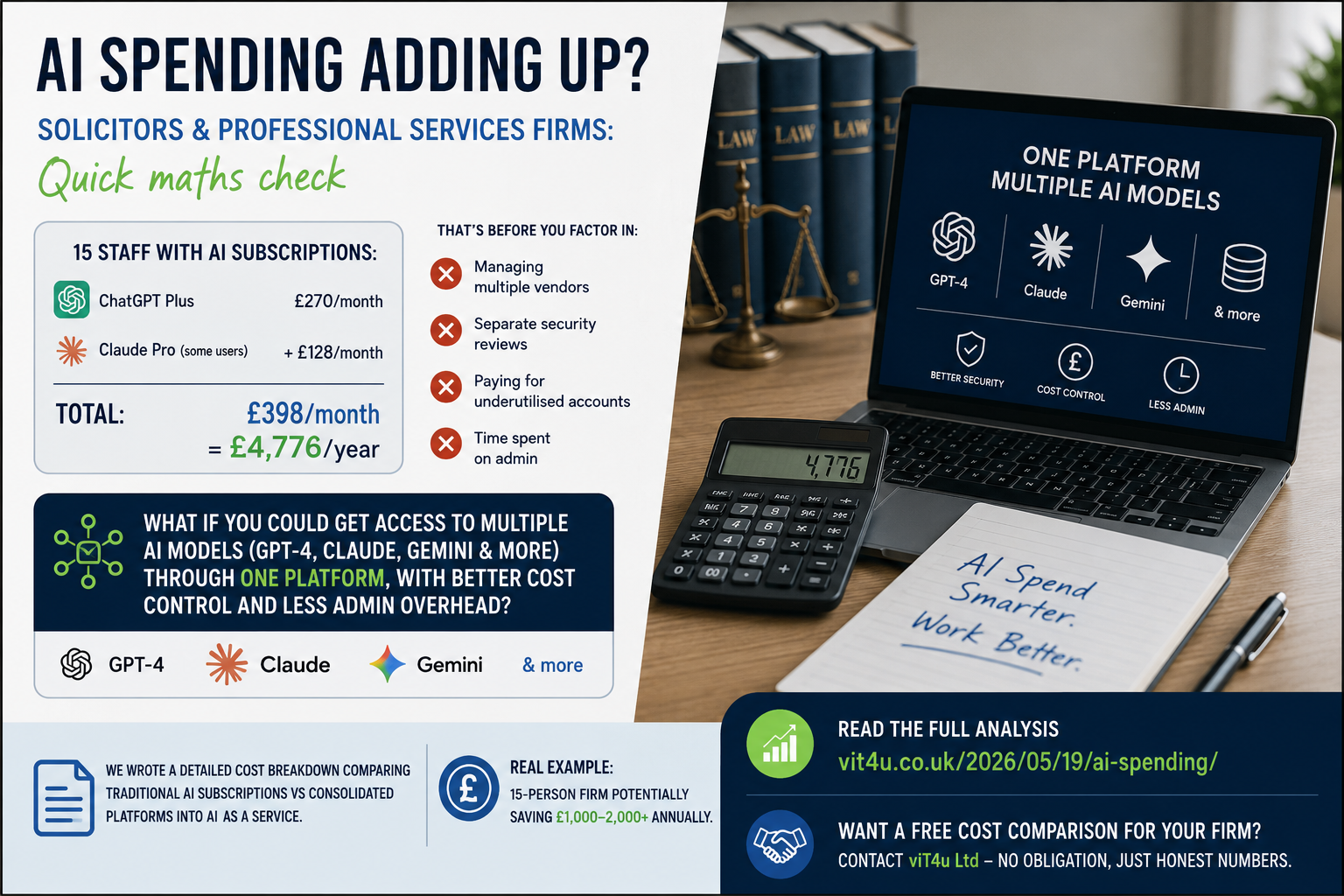
- 8 staff with both ChatGPT Plus (£18) and Claude Pro (£16) = £272/month
- 7 staff with ChatGPT Plus only = £126/month
- Monthly total: £398
- Annual cost: £4,776
- What you get: Maximum flexibility but also maximum cost and admin overhead
Plus hidden costs:
- Time spent managing multiple vendor relationships
- Separate security reviews for each platform
- Training staff on multiple different interfaces
- No centralised usage visibility or cost control
- Duplicate payments for underutilised accounts
The Consolidated Platform Approach with AI as a Service (AIaaS):
With a unified AIaaS platform:
- One subscription gives access to multiple AI models (GPT-4, Claude, Gemini, about 50 different ones in total at present)
- Flexible usage allocation across your team
- Single point of management and support through your MSP
- Centralised security and compliance
- Usage visibility to optimise costs
- Scale up or down based on actual needs, not rigid per-seat pricing
The potential savings? Many firms find they can reduce AI costs by 30-50% whilst actually improving capabilities—because you're not paying for multiple subscriptions when one consolidated platform gives you access to everything.
For a 15-person solicitors firm, that could mean saving £1,000-2,000+ annually whilst reducing administrative headaches and improving security oversight.
What to Ask Before You Buy (or Add Another AI Subscription)
Before approving that next AI tool request, ask yourself:
- Can our existing tools do this? (Probably worth a 10-minute check)
- Are we maximising what we already pay for? (Usage reports tell the story)
- What's our total monthly AI spend? (Add it all up - you might be surprised)
- Could we consolidate? (One platform, multiple models, better management)
- Are any staff using AI without a license? (that's a GDPR breach waiting to happen)
The Bottom Line
As an office manager, your job isn't to say "no" to AI tools—your team needs them to stay competitive. Your job is to say "yes, intelligently."
That means:
- Choosing platforms that grow with you, not against you
- Consolidating vendors where possible
- Getting visibility into usage and ROI
- Reducing administrative overhead
The AI revolution isn't going away. But with the right platform strategy, your budget doesn't have to suffer for it.
Ready to Stop Overpaying for AI Tools?
Get a free cost comparison for your firm.
At vIT4u Ltd, we help professional services firms consolidate their AI tools with AI as a Service (AIaaS)—giving you access to multiple leading AI models through one platform, one invoice, and one support team.
Book a cost assessment: We'll review your current AI spending and show you exactly what you could save.